For the complete documentation index, see llms.txt. Markdown versions of all docs pages are available by appending .md to any docs URL.
OAuth2 Proxy
Add user authentication with GitHub, Google, Azure AD, and other OAuth providers by integrating agentgateway with OAuth2 Proxy.
Agentgateway can integrate with OAuth2 Proxy to add user authentication through GitHub, Google, Azure AD, and other OAuth providers. Agentgateway uses an external authorization (extAuthz) policy to delegate authentication checks to OAuth2 Proxy, which redirects unauthenticated users to the provider’s login page.
This guide uses GitHub as the example provider. For other providers, see Use other OAuth providers.
Before you begin
- Install agentgateway.
- Install Docker and make sure it is running.
- Have a GitHub account so that you can create an OAuth app.
Step 1: Create a GitHub OAuth application
- Go to GitHub Developer Settings.
- Click OAuth Apps > New OAuth App.
- Fill in the application details.
- Application name:
agentgateway dev, or any name you choose. - Homepage URL:
http://localhost:3000 - Authorization callback URL:
http://localhost:4180/oauth2/callback
- Application name:
- Click Register application.
- Copy the Client ID.
- Click Generate a new client secret and copy the Client Secret.
Step 2: Set up your environment
Create a working directory.
mkdir oauth2-proxy-test && cd oauth2-proxy-testSave your GitHub OAuth credentials as environment variables.
export OAUTH2_PROXY_CLIENT_ID=<your-github-client-id>
export OAUTH2_PROXY_CLIENT_SECRET=<your-github-client-secret>
Generate a random cookie secret.
export OAUTH2_PROXY_COOKIE_SECRET=$(python3 -c 'import os,base64; print(base64.b64encode(os.urandom(32)).decode()[:32])')
Step 3: Start OAuth2 Proxy
Run OAuth2 Proxy in Docker.
docker run -d --name oauth2-proxy \
  -p 4180:4180 \
  --add-host=host.docker.internal:host-gateway \
  -e OAUTH2_PROXY_CLIENT_ID=$OAUTH2_PROXY_CLIENT_ID \
  -e OAUTH2_PROXY_CLIENT_SECRET=$OAUTH2_PROXY_CLIENT_SECRET \
  -e OAUTH2_PROXY_COOKIE_SECRET=$OAUTH2_PROXY_COOKIE_SECRET \
  -e OAUTH2_PROXY_COOKIE_SECURE=false \
  quay.io/oauth2-proxy/oauth2-proxy:latest \
  --provider=github \
  --email-domain='*' \
  --upstream=file:///dev/null \
  --http-address=0.0.0.0:4180 \
  --set-xauthrequest \
  --reverse-proxy=true
Verify that OAuth2 Proxy is running.
docker logs oauth2-proxyExample output:
[2026/08/06 20:34:54] [oauthproxy.go:180] OAuthProxy configured for GitHub Client ID: $OAUTH2_PROXY_CLIENT_ID
Step 4: Configure agentgateway
Create a
config.yamlfile. The configuration routes/oauth2/*requests to OAuth2 Proxy for login and callback handling, and protects the MCP application with anextAuthzpolicy that checks authentication and extracts the user’s identity.Review the following table to understand this configuration.# yaml-language-server: $schema=https://agentgateway.dev/schema/config frontendPolicies: accessLog: add: # Log the authenticated user's GitHub username and email github.user: 'extauthz.githubUser' github.email: 'extauthz.githubEmail' gateways: default: port: 3000 protocol: HTTP routes: # Route OAuth2 Proxy endpoints (login, callback, and so on) - name: oauth2-proxy matches: - path: pathPrefix: /oauth2 policies: urlRewrite: authority: none backends: - host: localhost:4180 # Protected MCP application - name: application backends: - mcp: targets: - name: everything stdio: cmd: npx args: ["@modelcontextprotocol/server-everything"] policies: cors: allowOrigins: ["*"] allowHeaders: ["*"] exposeHeaders: ["Mcp-Session-Id"] extAuthz: host: localhost:4180 includeRequestHeaders: - cookie protocol: http: # Check authentication status path: '"/oauth2/auth"' # Redirect unauthenticated users to login redirect: '"/oauth2/start?rd=" + request.path' # Extract user info from OAuth2 Proxy response headers metadata: githubUser: response.headers["x-auth-request-user"] githubEmail: response.headers["x-auth-request-email"] addRequestHeaders: x-forwarded-host: request.host includeResponseHeaders: - x-auth-request-userSetting Description frontendPolicies.accessLog.addLogs the GitHub username and email from authenticated requests. routes(oauth2-proxy)Routes /oauth2/*requests to OAuth2 Proxy for login and callback handling.routes(application)The protected MCP endpoint with external authorization. extAuthz.hostThe OAuth2 Proxy address for authentication checks. extAuthz.protocol.http.pathThe endpoint that OAuth2 Proxy uses to validate authentication. extAuthz.protocol.http.redirectWhere to send unauthenticated users. extAuthz.protocol.http.metadataExtracts user information from the OAuth2 Proxy response headers. Start agentgateway
agentgateway -f config.yaml
Step 6: Test the authentication flow
Send an unauthenticated request. Because the request has no session cookie, agentgateway redirects it to the login flow.
curl -i http://localhost:3000/mcpExample output:
HTTP/1.1 302 Found
location: /oauth2/start?rd=/mcp
Test the flow in a browser.
You are redirected to GitHub for authentication.
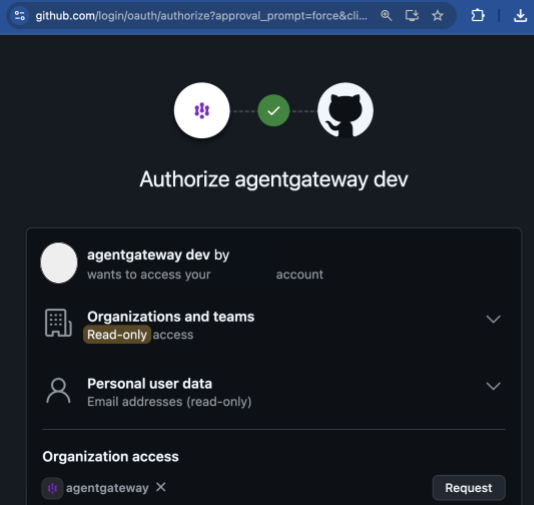
After you log in, you are redirected back to the MCP endpoint.
In the terminal where you are running agentgateway, review the logs. Notice your GitHub username and email in the
github.userandgithub.emailaccess log fields.Example output:
2026-08-06T21:10:58.810727Z info request gateway=default/default listener=default route=default/application src.addr=[::1]:52638 http.method=GET http.host=localhost http.path=/ http.version=HTTP/1.1 http.status=406 protocol=mcp error="mcp: client must accept text/event-stream" reason=MCP duration=2ms github.user="<USERNAME>" github.email="<EMAIL@EXAMPLE.COM>"
Use other OAuth providers
OAuth2 Proxy supports many providers. To use a different provider, update the Docker command from Step 3.
docker run -d --name oauth2-proxy \
  -p 4180:4180 \
  --add-host=host.docker.internal:host-gateway \
  -e OAUTH2_PROXY_CLIENT_ID=$GOOGLE_CLIENT_ID \
  -e OAUTH2_PROXY_CLIENT_SECRET=$GOOGLE_CLIENT_SECRET \
  -e OAUTH2_PROXY_COOKIE_SECRET=$OAUTH2_PROXY_COOKIE_SECRET \
  -e OAUTH2_PROXY_COOKIE_SECURE=false \
  quay.io/oauth2-proxy/oauth2-proxy:latest \
  --provider=google \
  --email-domain='*' \
  --upstream=file:///dev/null \
  --http-address=0.0.0.0:4180 \
  --set-xauthrequest \
--reverse-proxy=trueProduction considerations
For production deployments, consider the following.
- Set
OAUTH2_PROXY_COOKIE_SECURE=trueand use HTTPS. - Restrict
email-domainto your organization’s domain. - Use a persistent cookie secret instead of a randomly generated one.
- See the OAuth2 Proxy documentation for additional security options.
Cleanup
Stop and remove the OAuth2 Proxy container.
docker stop oauth2-proxy && docker rm oauth2-proxyRemove the working directory with the agentgateway config file.
cd .. && rm -rf oauth2-proxy-testIn your GitHub account’s developer settings, delete the OAuth app.